KineMaster
KineMaster Pro Features: What Do You Get With Premium?
Video editing has become an important part of online content. YouTube creators, social media users, students, and businesses all need good editing tools. A mobile video editor can make this work much easier.
KineMaster offers a free editing experience along with premium features for users who want more tools. The premium version adds extra options that can help creators make cleaner and more professional videos.
In this guide, we will explore the main KineMaster Pro features and explain what users can expect from the premium experience.
What Is KineMaster Pro?
KineMaster Pro is the premium experience offered by the KineMaster video editing app. It provides additional features beyond the basic editing tools. These features can help creators produce more polished videos.
KineMaster Pro is designed for users who edit videos regularly. It can provide access to premium assets and additional editing options.
The premium version can be useful for different types of creators. You can use it for YouTube videos, Shorts, Reels, tutorials, presentations, and personal projects.
Who Can Use the Premium Version?
It can suit:
- YouTube creators
- Social media users
- Students
- Freelancers
- Small businesses
- Video editors
- Content creators
With KineMaster, users can work on projects directly from compatible mobile devices. The premium plan can make the editing process more flexible.
No Watermark on Exported Videos
One of the main reasons users consider a premium video editor is watermark removal. A watermark can affect the appearance of a finished video, especially when you want a clean and professional presentation.
KineMaster Premium can allow eligible subscribers to export videos without the standard watermark associated with the free experience.
This can make videos look cleaner when you upload them to social platforms. It can also help creators maintain a consistent brand style.
Why Does a Watermark Matter?
A watermark can be noticeable in:
- YouTube videos
- Instagram Reels
- TikTok-style videos
- Business presentations
- Promotional content
- Educational projects
For creators who publish videos frequently, KineMaster without a watermark can provide a more professional-looking result.
Access to Premium Assets
Video editors often include libraries of creative assets. These can include music, sound effects, stickers, transitions, images, and other resources.
KineMaster Premium provides access to premium assets that can expand the creative choices available during editing.
Instead of creating every element from scratch, users can select suitable assets and add them to their projects. This can save time and improve the overall look of a video.
Types of Creative Assets
Premium content may include:
- Music tracks
- Sound effects
- Stickers
- Visual effects
- Transitions
- Graphics
- Fonts
- Background elements
Using KineMaster premium assets can help creators add more variety to their videos while keeping the editing process simple.
Advanced Video Editing Tools
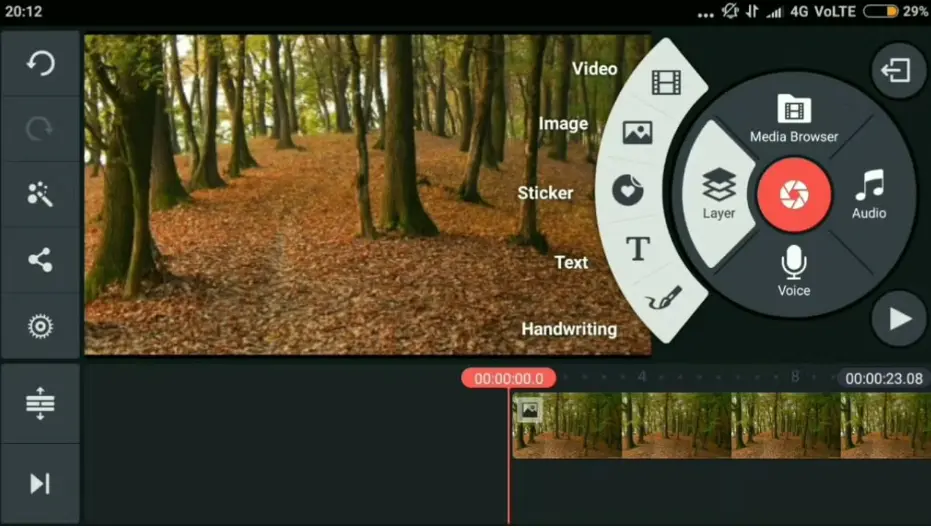
Premium access can be valuable when you need more control over your projects. A detailed editing timeline allows users to work with different layers and media elements.
KineMaster supports multi-layer editing, which lets creators combine video clips, images, text, stickers, and other elements in one project.
This setup works well for complex videos. You can arrange different elements independently and adjust their timing.
Useful Editing Controls
Creators can work with tools such as:
- Trimming
- Splitting
- Cropping
- Layer editing
- Speed control
- Keyframe animation
- Color adjustments
- Transitions
With KineMaster, creators can build projects step by step instead of relying only on automatic editing.
Better Audio Editing Options
Audio is an important part of video production. Poor sound can make even a good video feel less professional.
KineMaster provides tools for adding music, voice recordings, and sound effects to video projects. Users can arrange multiple audio elements on the timeline.
Premium assets can also provide additional audio choices. This gives creators more options when selecting background music or sound effects.
Audio Features
Useful audio tools include:
- Music tracks
- Sound effects
- Voiceovers
- Volume control
- Audio trimming
- Multiple audio layers
- Timing adjustments
Creators using KineMaster can combine different audio elements to create a better sound experience.
Professional-Looking Video Effects
Effects can make videos more interesting. They can help highlight important moments and create a specific visual style.
KineMaster includes a range of effects and editing options that creators can use to customize their projects. Premium content can add even more creative choices.
You can apply effects to different parts of a video. You can also combine them with text, images, and other layers.
Where Can You Use Effects?
Effects can work well for:
- Gaming videos
- Travel videos
- YouTube Shorts
- Instagram Reels
- Product videos
- Tutorials
- Promotional content
Using KineMaster effects carefully can help your videos look more engaging without making them difficult to watch.
High-Quality Video Export
Export quality matters when publishing videos online. Creators want their finished projects to look sharp and clear.
KineMaster supports high-quality video editing and export options, depending on the device, project, and available app features.
Before exporting, you should choose settings that match your target platform. A YouTube video may need different settings from a short social media clip.
Things to Check Before Exporting
Consider:
- Resolution
- Frame rate
- File size
- Available storage
- Platform requirements
- Device performance
With KineMaster, choosing suitable export settings can help you maintain good video quality while managing file size.
Premium Tools for Content Creators
Premium editing features can help creators save time. Instead of using multiple apps, you can complete many editing tasks in one place.
KineMaster can support creators who need to edit videos regularly. Its combination of timeline tools, layers, effects, audio options, and premium assets can support different workflows.
This can be useful for creators who publish content on multiple platforms.
Content You Can Create
You can use the editor for:
- YouTube videos
- YouTube Shorts
- Instagram Reels
- Tutorials
- Vlogs
- Educational videos
- Business content
- Personal projects
For regular creators, KineMaster Premium can provide a broader set of tools for daily editing tasks.
Is KineMaster Pro Worth It?
The value of a premium plan depends on your editing needs. Casual users may only need basic editing tools. Regular creators may benefit more from premium features.
KineMaster Pro can be useful if you frequently create videos and want additional creative resources and a cleaner export experience.
Before subscribing, check the current plan, price, available features, and supported devices. Premium features can change over time.
Consider Premium If You Need
- Watermark-free exports
- More creative assets
- Regular video editing
- Advanced editing controls
- More audio resources
- Professional-looking projects
If you only edit videos occasionally, KineMaster Free may provide enough tools for your needs.
Final Thoughts
Premium video editing features can make content creation easier. They can provide more creative resources and give users greater control over their projects.
KineMaster Pro focuses on features that can help regular creators produce polished videos from a mobile device. Premium assets, advanced editing tools, audio options, effects, and watermark-free exports can all be useful for content production.
Before choosing a premium plan, think about how often you edit and which features you actually need. KineMaster Premium can be a practical option for creators who want more control and more creative options in their editing workflow.
1 thought on “KineMaster Pro Features: Advanced Tools for Video Editing”